
Short answer: to run an AI chatbot on WhatsApp in Sri Lanka you need official WhatsApp Business API access, an AI agent platform connected to it, a knowledge base the bot can answer from, and a human hand-off path. You can usually launch a focused first version, such as FAQs and lead capture, in a few weeks.
Updated 25 October 2026.
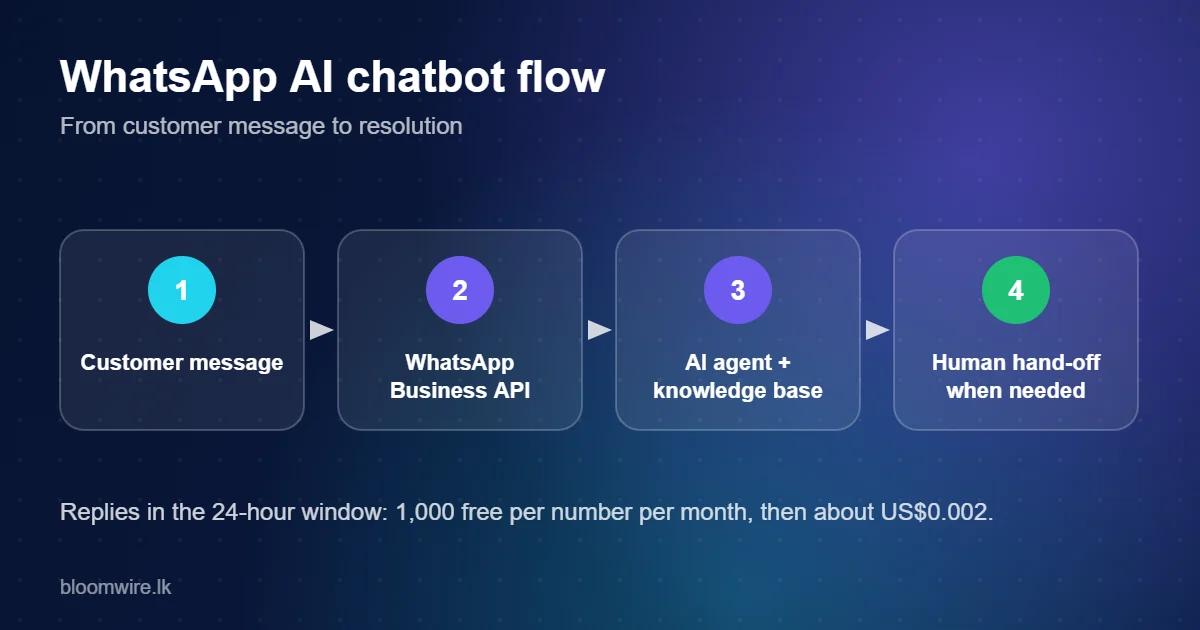
What a WhatsApp AI chatbot can do
- Answer product, pricing, delivery and policy questions at any hour.
- Qualify leads and book appointments or demos.
- Send order, payment and delivery updates using approved templates.
- Escalate to a human with the full chat history.
- Reply in Sinhala, Tamil or English depending on what the customer writes.
Setup in seven steps
- Get WhatsApp Business API access. Follow our guide on getting the WhatsApp Business API in Sri Lanka or start here.
- Define the scope. Choose three to five jobs for the bot (for example opening hours, pricing, order status, booking, lead capture).
- Build the knowledge base. Gather approved answers, product sheets and policies. Clean, current content matters more than quantity.
- Configure the AI agent. Set tone, languages, what it must never do, and when to escalate.
- Create message templates for anything you send outside the 24-hour window, such as reminders or follow-ups.
- Test. Run real customer questions in Sinhala, Tamil, English and romanised text. Fix wrong or vague answers before launch.
- Launch, measure and improve. Track resolution rate, hand-offs and unanswered questions weekly.
Best practices
- Greet the customer, say it is an automated assistant and offer a "talk to a person" option.
- Keep answers short; WhatsApp is a mobile chat, not an email.
- Use buttons and lists for common choices to cut typing.
- Ask for consent before marketing messages and honour opt-outs, as required by Sri Lanka's PDPA.
- Never collect passwords or card numbers in chat.
What it costs
Three parts: the platform fee, AI usage, and Meta's per-message fees. For Sri Lanka as of October 2026, replies in the customer service window are free up to 1,000 per business phone number per month and about US$0.002 afterwards, while outbound marketing templates are about US$0.0732 each. Details on our pricing page.
Frequently asked questions
Do I need the WhatsApp Business API to run a chatbot?
Yes. The free WhatsApp Business app does not support AI agents or full automation; chatbots run on the official API.
Can the WhatsApp chatbot speak Sinhala and Tamil?
It can, if the AI model and your knowledge base support those languages. Test with real, mixed-language customer messages.
Is a WhatsApp chatbot free of Meta charges?
Service replies are free up to 1,000 per number per month, then billed per message. Templates you send outside the window are charged by category.
How do I hand over to a human agent?
Configure escalation rules (customer request, low confidence or sensitive topics) so the chat moves to a shared inbox with the full history.
How long does it take to launch?
A focused first version is typically a matter of weeks, depending on how ready your content is and how quickly you get WhatsApp API access.
Related reading
- AI chatbots for business in Sri Lanka: how Sinhala, Tamil and English support really works
- How to get the WhatsApp Business API in Sri Lanka: step-by-step guide (2026)
Talk to Bloomwire: see AI live chat and Unecast AI Studio, or contact our team for a demo.