
Short answer: to get the WhatsApp Business API in Sri Lanka you register a verified business with Meta, connect a phone number that is not in use on a regular WhatsApp account, and go live through an official provider such as a Meta Tech Provider using Embedded Signup. You then get message templates approved and pay Meta's per-message fees plus your provider's platform fee.
Updated 25 October 2026.
WhatsApp Business app vs WhatsApp Business API
The free WhatsApp Business app suits a single shop with one or two people answering chats. The API (the WhatsApp Business Platform) is for companies that need several agents on one number, automation and chatbots, system integrations (CRM, ordering, ticketing), broadcast campaigns with approved templates, and delivery reporting. You can read more about our offering on the WhatsApp Business API in Sri Lanka page.
What you need before you start
- A Meta Business portfolio (formerly Business Manager) for your company.
- Business verification with documents that match your registered company details.
- A phone number that can receive an SMS or voice call for verification. If it is already on the WhatsApp app, it must be removed or migrated first.
- A display name that follows Meta's naming policy and represents your brand.
- A payment method on your WhatsApp Business Account.
- A website or social presence that shows who you are.
Step-by-step
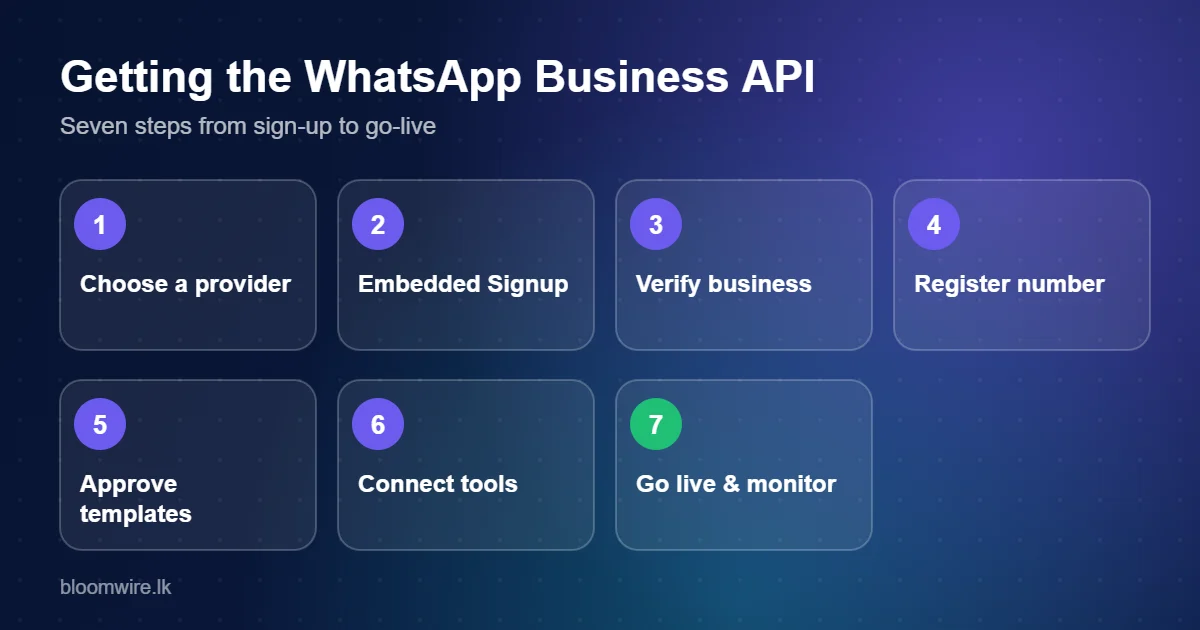
- Choose your provider. Official access comes through Meta-approved providers. Compare platform fees, support in Sri Lanka, inbox and chatbot tools, API quality and onboarding help.
- Start Embedded Signup. The provider's sign-up flow lets you log in with Facebook, select or create your Meta Business portfolio and create your WhatsApp Business Account without leaving the provider's screen.
- Verify your business. Upload the requested company documents. Verification time depends on Meta and on how cleanly your documents match your public details.
- Register and verify your number and set your display name and profile (logo, description, address, website).
- Create message templates. Anything you send outside a 24-hour customer service window must use a template approved by Meta in a category: marketing, utility or authentication.
- Connect your tools. Set up the shared inbox, connect your CRM or website through the API or webhooks, and add chatbot or AI flows.
- Go live and monitor quality. Meta tracks quality rating and limits based on user feedback, so only message opted-in customers.
What it costs
You pay Meta per delivered message (about US$0.0732 for marketing and US$0.002 for utility, authentication and post-free-tier service messages to Sri Lanka as of October 2026) plus your provider's subscription or platform fee. See the full breakdown and calculator on our pricing page.
Consent and compliance
Only message people who have opted in, tell them how to opt out, and keep records of consent. Sri Lanka's Personal Data Protection Act (Act No. 9 of 2022) requires consent for electronic marketing and a free way to withdraw it.
How to choose a provider in Sri Lanka
- Official Meta partner status (Tech Provider or Business Solution Provider).
- Local support in your time zone and, ideally, Sinhala and Tamil assistance.
- Transparent per-message pricing with no hidden markup.
- Shared inbox, templates manager, campaign tools and API access in one place.
- Native AI and chatbot capabilities, see AI live chat.
- Clear data handling and PDPA awareness.
Bloomwire's platform, Unecast, covers WhatsApp messaging, calling, a shared inbox, automation and AI agents.
Frequently asked questions
Can I get WhatsApp Business API access directly from Meta?
Most businesses onboard through a Meta-approved provider using Embedded Signup. The provider handles the technical setup, tooling and support.
How long does WhatsApp Business API setup take?
Setup itself can be quick; the variable part is Meta's business verification and template approval, which depends on your documents and Meta's review queue.
Can I use my existing WhatsApp number?
Yes, but a number can't be active on the regular WhatsApp or WhatsApp Business app and the API at the same time. Back up your chats and follow your provider's migration steps.
Do I need a registered company?
Business verification asks for documents proving your business identity, so a registered business is the normal route.
Is the WhatsApp Business API suitable for small businesses?
Yes if you need multiple agents, automation or integrations. If you only answer a few chats a day, the free WhatsApp Business app may be enough.
Related reading
- WhatsApp Business API pricing in Sri Lanka from 1 October 2026: what changed
- WhatsApp AI chatbot for Sri Lankan businesses: how to set one up
Talk to Bloomwire: we are a Sri Lankan company and a Meta Tech Provider. Contact our team for a quote or a live demo.